


RCForb Client
4.287.00 Reviews
App Specs
- Version
- 0.0087
- Updated On
- License
- $9.99
- Downloads
- 10,000+
- Developer
- RemoteHams.com
- Categories
- Communication
- Platform
- Android
Screenshots
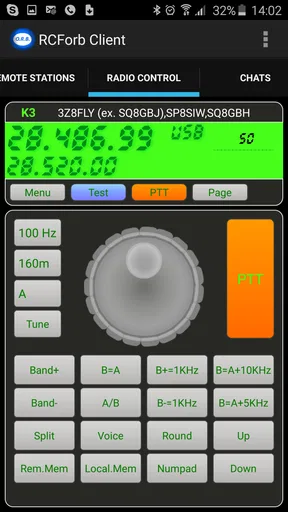
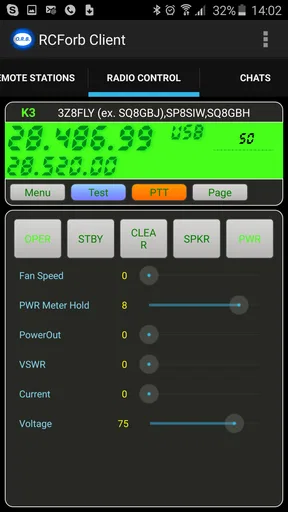
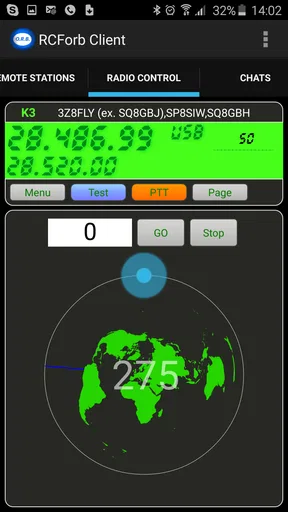
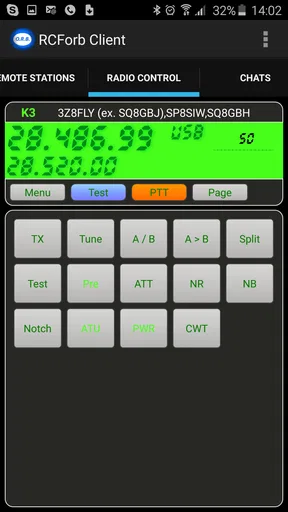
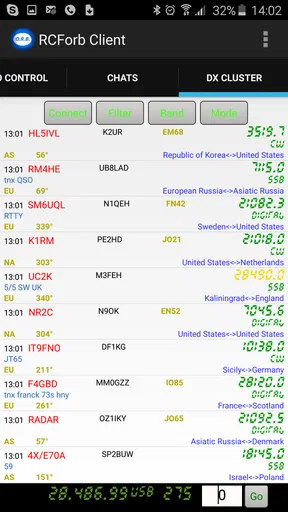
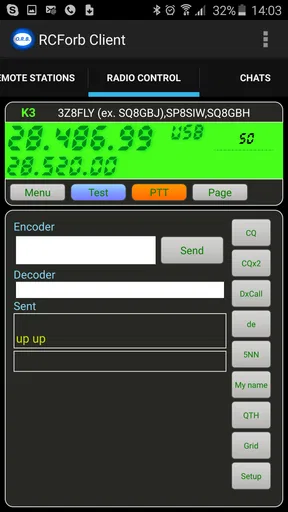
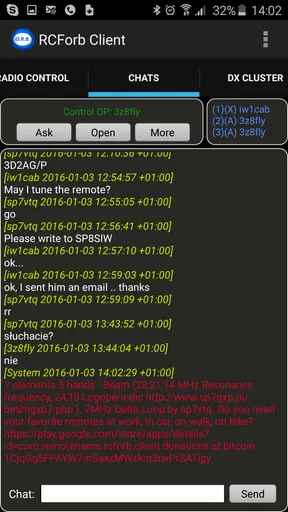
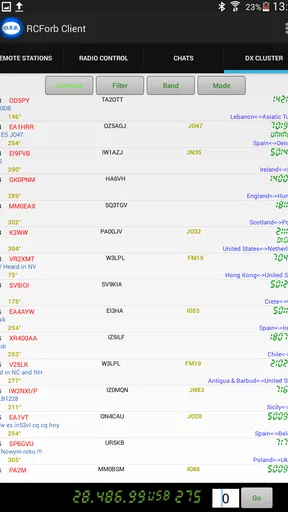
 Analysis by AppCompare
RemoteHams.com’s RCForb Client is a communication app for people who want to operate compatible remote amateur-radio stations from an Android device. I approached it less like a casual messaging app and more like a compact control panel: useful when I already know what I want to do, less welcoming when I expect a polished, guided mobile experience.
The app is listed as RCForb Client, and its full identity makes the purpose clearer. It is the Android client from RemoteHams.com for the RCForb remote-station system. That distinction matters because this is not a general voice, chat, or social communication tool. Its value depends on access to the relevant remote-radio environment and on the user understanding how remote operation works.
In everyday terms, I would recommend it to an amateur-radio user who wants a mobile route into a remote station rather than carrying out every session from a desktop computer. I would not recommend it simply because someone is looking for an easy way to talk with friends. The app belongs to a specialized corner of communication, and its learning curve reflects that.
How I would use it in a normal remote-radio session
The most sensible baseline workflow starts before opening the app. I would first decide which station or operating task I want to handle, make sure my account and access arrangements are already in order, and then use the client for the actual remote connection. This preparation prevents the common mistake of treating the phone as a complete substitute for understanding the station itself.
Once inside, the useful habit is to work deliberately instead of tapping around. Remote operation involves more than pressing a connection button: I need to know what equipment I am controlling, what the station allows, and how I will end the session cleanly. On a small screen, that planning becomes even more important because there is less room to see context at a glance.
A realistic scenario would be checking a remote station from another room before a short listening session. I might connect, confirm that the station is available, adjust the controls I need, monitor the result, and disconnect when finished. For that kind of brief check, a mobile client can be more convenient than starting a computer, opening a browser-based workflow, and settling in at a desk.
The trade-off is that convenience does not automatically mean simplicity. A phone gives me portability, but it also gives me a smaller display and a less comfortable control surface. If I am doing careful tuning, switching among many controls, or trying to diagnose an unfamiliar setup, I would rather use a larger screen and a more deliberate workstation.
Worth Reading Before You Choose

EA SPORTS FC Mobile 26 Is a Bigger Football Game, but It Takes Time

Flipboard Shows What News Apps Must Do Beyond the Feed

Switching to Android Auto Means Rethinking Your Driving Routine

Google Calendar Makes a Crowded Week Easier to Manage

Ludo King Makes the Most of the Minutes Between Plans

Baby Panda World Brings Quick Play to Modern Phones, but Its Game Library Feels Busy
That is where the app’s audience becomes clear. Experienced radio operators can bring their own knowledge to the interface and concentrate on the connection. A newcomer may instead wonder what each control means, whether a problem comes from the app, the remote station, or the network, and which action is safe to take next.
The first setup decisions make a bigger difference than expected
Before relying on the client away from home, I would spend time checking the connection and learning the layout while I am not under pressure. I would also keep the first sessions short. This gives me a chance to understand the sequence of connecting, operating, and disconnecting without turning a rushed operating opportunity into a troubleshooting exercise.
One practical tip is to write down the few controls I use most often and the order in which I use them. That may sound old-fashioned, but it is effective on a mobile interface. Instead of searching visually through every option, I can follow a repeatable routine and notice quickly when something behaves differently.
Another useful habit is to separate “station problem” from “client problem.” If a connection does not behave as expected, I would avoid changing several settings at once. I would reconnect carefully, verify the basic state, and change only one relevant option at a time. This is especially valuable with remote equipment because an incorrect assumption can look like a software fault.
People often ask whether the app is suitable for a first remote-radio experience. My answer is: only if the user has someone or something else to explain the station workflow. The app can be part of a beginner’s setup, but I would not treat it as a self-teaching course. Its strongest role is giving an informed operator mobile access, not replacing radio knowledge.
Settings deserve a calm first inspection
I would not begin by changing every available option. The better approach is to identify the settings that affect how I connect and operate, then leave everything else alone until a real need appears. In a specialized client, unnecessary experimentation can create confusion without improving the session.
The first settings worth checking are the connection details and any choices that determine how the remote station is reached. I would confirm them carefully, save only what I understand, and test the result immediately. If I use more than one station, I would keep a simple note of which configuration belongs to which destination rather than relying on memory.
Audio deserves particular attention in a mobile workflow. A phone may switch between its speaker, wired audio, or Bluetooth equipment depending on the situation. I would test the audio path before an important session, because a perfectly successful connection is not very useful if I cannot comfortably hear what is happening or if the chosen accessory introduces awkward delay.
I would also check the phone’s own behavior. Battery-saving modes, unstable wireless coverage, and accidental screen touches can all make remote operation feel unreliable even when the client is functioning normally. Keeping the device charged, using a stable connection, and placing the phone where it will not be disturbed are simple steps, but they matter more than cosmetic adjustments.
There is a subtle trade-off here: a mobile device is convenient precisely because it is always nearby, yet that also means it is exposed to interruptions. Notifications, incoming calls, and switching to another app can break concentration. For a short listening check this may be tolerable; for a serious operating session, I would prepare the phone as a dedicated tool rather than treating it like a casual background device.
Users also ask whether paying for the app guarantees a smoother experience than using a free communication alternative. I would not frame it that way. The listed price is $9.99, but the real question is whether the RCForb workflow matches the user’s equipment and habits. A free general-purpose voice or messaging app may be better for conversation, while this client is more relevant when direct remote-station control is the goal.
Experienced users build speed through repeatable patterns
The fastest way to use a specialized mobile client is usually not to rush. I found that speed comes from reducing decisions. I would keep a consistent order: prepare the device, open the client, select the intended station, verify the connection, make the necessary adjustments, and close the session deliberately.
That sequence is more valuable than trying to memorize every control immediately. It gives me checkpoints. If something fails, I know roughly where the problem occurred. If the session works, I can repeat the same process next time instead of improvising.
A second pattern is to use the app for clearly defined tasks rather than vague exploration. For example, I might use it to check a station, carry out a short listening session, or make a specific adjustment that I already understand. I would avoid opening it with no plan and then changing controls simply because they are available.
This approach also helps with mobile ergonomics. I would hold the phone in a stable position, use one deliberate touch at a time, and pause after important actions so I can see the result. On a desktop, a mistaken click may be easy to reverse because the whole layout is visible. On a phone, a hurried tap can be harder to interpret.
A third insight is to keep a small operating log. I would note the station used, the general purpose of the session, and any unusual behavior. It does not need to become formal paperwork. A few lines can reveal whether a recurring problem follows a particular station, location, audio accessory, or connection condition.
Shortcuts, in the practical sense, come from preparation. If I regularly use the same station, I would keep its details and operating routine close at hand. If I regularly use the same headphones, I would connect them before starting. If I know a session will be brief, I would avoid opening unrelated apps that could interrupt the workflow.
The app’s rating sits at a 4.2 average from roughly 384 ratings, which suggests that many users find the basic idea worthwhile while still leaving room for different expectations. I read that kind of response as a reminder that specialized tools are judged by fit. Someone who understands remote radio may value direct access, while someone expecting mainstream mobile polish may be less patient with the interface.
Where the mobile approach reaches its limits
The biggest limitation is not necessarily one isolated control; it is the compromise created by putting a remote-radio workflow on a small touchscreen. A phone is excellent for access and quick checks, but it is not automatically the best place for detailed operation. Visibility, touch accuracy, audio comfort, and concentration all become part of the experience.
I would also be cautious about depending on the app when the network is unpredictable. Remote control already relies on communication between the device and the station. A weak or changing connection can make the session feel inconsistent, and mobile connectivity may vary as I move around. For important or technically demanding work, a stable desktop setup is the safer choice.
Another limit is the difference between having access and having authority. The client can be useful only within the access arrangements of the remote station environment. I would never assume that installing the app alone provides meaningful control over a station. The user needs the appropriate account, permissions, and operating knowledge already in place.
This is also why I would skip it if my main goal is ordinary communication. If I want group chats, file sharing, video calls, or casual messaging, mainstream communication apps are more suitable and easier for other people to join. RCForb Client makes sense when the remote-radio connection itself is the reason for installing it.
The age rating is Everyone, and the app is an Android communication product rather than a game. That makes it broadly approachable from a content perspective, but “Everyone” should not be confused with “effortless for everyone.” The technical subject matter still favors users who know the basics of amateur-radio operation or have guidance from an experienced operator.
Compatibility is another practical consideration. The listed minimum operating system is Android 4.4, and the current version is 0.0087. Those details make the app potentially relevant to older Android hardware, but I would still test it on the exact phone I plan to use. Older devices may be convenient for leaving a dedicated control phone near a workstation, yet their battery, audio, and network behavior can differ from a newer daily-use phone.
The app was released on May 14, 2015, and its long presence helps explain why I would approach it as a focused utility rather than a modern social platform. I would judge it by whether it reliably supports my remote-station routine, not by whether it resembles the newest consumer communication apps.
Who should choose it, and who should look elsewhere?
I think it is a good fit for an amateur-radio user who already works with the RCForb ecosystem and wants mobile flexibility. It is particularly appealing when the main benefit is being able to check or operate a compatible remote station without sitting at a full computer. Users who enjoy building routines and troubleshooting methodically will get more from it than people who want instant simplicity.
I would be more hesitant to recommend it to someone buying a phone app as their first introduction to remote radio. In that case, learning the station, the operating rules, and the meaning of the controls should come first. The client can support that learning, but it is not a replacement for it.
I would also steer away from it for users who need a rich desktop-style view, frequent multitasking, or long sessions with many simultaneous controls. A computer-based workflow will usually be more comfortable in those situations. The phone version is strongest when portability has a clear purpose.
Compared with ordinary communication apps, this client is narrower but more purposeful. Messaging tools are better for coordinating with people; voice-call apps are better for conversation; browser or desktop remote-control options may be better for visibility. RCForb Client occupies the space between those choices by focusing on access to a remote amateur-radio station from Android.
My verdict after looking at the whole workflow
I see RCForb Client as a practical specialist tool, not an all-purpose communication app. Its appeal comes from removing the need to be tied to a full computer whenever a compatible remote-radio task can be handled from a phone. That is a meaningful advantage for the right user, especially when sessions are short, planned, and familiar.
My recommendation is conditional but positive: choose it if you already understand the RCForb environment and value mobile access. Before relying on it, establish a repeatable connection routine, test your audio path, keep station details organized, and learn which controls you genuinely use. Those habits make the app feel far more manageable than random tapping.
I would skip it if I wanted casual communication, a beginner-friendly radio course, or a large-screen control experience. In those cases, another category of app or a desktop workflow would serve me better. For an experienced user who wants a focused Android route into remote operation, though, the app’s specialization is exactly its reason to exist.
RemoteHams.com has kept the product centered on that specific job, and the result is easy to understand once the user approaches it with realistic expectations. It is not trying to replace every communication tool. It is a compact bridge to a particular remote-radio workflow, and its success depends as much on the operator’s preparation as on the app itself.
Pros
- Controls compatible RCForb radios remotely from a mobile device.
- Provides convenient access to radio controls away from the shack.
- Useful for monitoring and operating supported amateur radio stations.
- Compact interface uses less screen space than a full desktop setup.
- Can make remote radio access practical on phones and tablets.
Cons
- Requires an RCForb server and compatible radio setup to function.
- Performance depends heavily on internet speed and connection stability.
- Small controls may be difficult to use accurately on some phones.
- Radio compatibility and available features depend on the server configuration.
- Remote operation can consume significant mobile data during longer sessions.
FAQs for RCForb Client
What is RCForb Client, and what can I use it for?
RCForb Client is a mobile application that lets you connect to and operate compatible remote amateur radio stations through the internet. After choosing an available station, you can typically tune frequencies, listen to received audio, and use supported controls remotely. It is useful for licensed radio operators who want access to equipment away from home, although the exact functions depend on the station configuration and its owner’s permissions.
Do I need an amateur radio license to use RCForb Client?
A license may not be required simply to install the application or listen to stations where receive access is publicly available. However, transmitting through a remote amateur radio station is generally subject to amateur radio regulations, licensing requirements, and the rules of the station’s country. Before transmitting, check the station’s access policy and make sure your license, callsign, operating privileges, and identification requirements are valid.
Does RCForb Client work with every amateur radio station or radio model?
No. RCForb Client depends on stations running compatible remote-control software and configured to accept mobile connections. Support for frequency tuning, mode selection, filters, audio, transmit controls, and other features can vary considerably between stations. Some stations may be receive-only, unavailable, password-protected, or limited to certain radios and bands. The app’s station list and individual station information should be checked before downloading.
What internet connection and permissions does RCForb Client require?
Because RCForb Client communicates with a remote station, a stable internet connection is essential. Wi-Fi or a reliable mobile-data connection will generally provide a better experience than a weak or congested network, especially for live audio and transmitting. Depending on the platform and version, the app may request network-related permissions and access to audio functions. Mobile-data usage can increase during extended listening sessions.
Is RCForb Client free, and are there any limitations I should know about?
The availability and cost of RCForb Client can depend on the platform, version, and distribution method, so users should verify the current store listing before installing. Even when the app itself is free, access to particular remote stations may be restricted by their owners, require credentials, or be unavailable at certain times. Performance also depends on server uptime, station hardware, network quality, and local radio regulations.


